Cluster


| option | description | Allowed values |
|---|---|---|
| output-format | format the output to one of table, json or yaml | string |
proxcli cluster status
| option | description | Allowed values |
|---|---|---|
| output-format | format the output to one of table, json or yaml | string |
| max-items | max number of log lines we grab from nodes | integer |
| proxmox-nodes | comma separated list of nodes issuing the log lines | string |
| severities | filter logs by severities. this option is a coma separated list of severities labels (panic,alert,critical,error,warning,notice,info,debug) | string |
proxcli cluster logproxcli cluster log --severities critical,error,warning --max-items 1000
High Availability ensures that a VM will stay running even if an individual node is shut down. This means that if the device is either powered off or has any sort of issue, the VM will automatically migrate to another node and start there. This will use all nodes to ensure the VMs configured will stay running as close to 100% of the time as possible.
source: https://www.wundertech.net/how-to-set-up-a-cluster-in-proxmox/
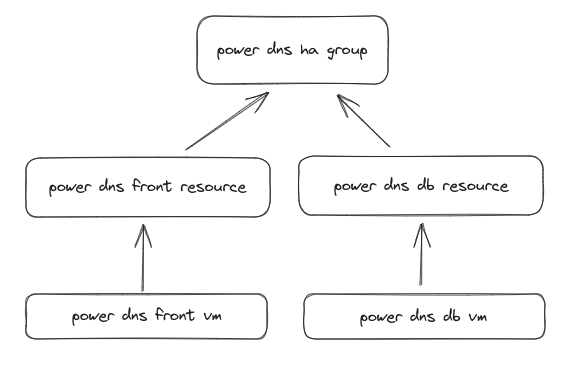
Virtual machine HA in proxmox depend on two concepts:
An HA group is a logical configuration specifying on which nodes the vm can be migrated when a proxmox node fail. HA resouces is a virtual machine associated with an HA group. Several resources can be created and associated with a group.


| option | description | Allowed values |
|---|
proxcli cluster ha groups list
| option | description | Allowed values |
|---|---|---|
| group | Cluster ha group name to be created | string |
| proxmox-nodes | On which proxmox nodes the group should apply | string |
| restricted | The CRM tries to run services on the node with the highest priority. If a node with higher priority comes online, the CRM migrates the service to that node. Enabling nofailback prevents that behavior. | N/A |
| nofailback | Resources bound to restricted groups may only run on nodes defined by the group. The resource will be placed in the stopped state if no group node member is online. Resources on unrestricted groups may run on any cluster node if all group members are offline, but they will migrate back as soon as a group member comes online. One can implement a preferred node behavior using an unrestricted group with only one member. | N/A |
proxcli cluster ha groups create --group powerdns --nofailback --proxmox-nodes "pve1,pve2"
| option | description | Allowed values |
|---|---|---|
| group | Cluster ha group name to be deleted | string |
It is impossible to delete a group with associated resources. You must first delete resources from group and then delete the group
proxcli cluster ha groups delete --group powerdns
| option | description | Allowed values |
|---|
proxcli cluster ha resources list
| option | description | Allowed values |
|---|---|---|
| group | the cluster ha group this resource belong to | string |
| vmid | the virtual machine id you want to assign to the resource | string |
| name | the cluster ha resource name | string |
| comment | additional information for this resource | N/A |
| state | Requested resource state. The CRM reads this state and acts accordingly. Please note that enabled is just an alias for started. (disabled | enabled |
| max-relocate | Maximal number of service relocate tries when a service failes to start | integrer |
| max-restart | Maximal number of tries to restart the service on a node after its start failed. | integer |
proxcli cluster ha resources add --group gitlab --vmid 105
| option | description | Allowed values |
|---|---|---|
| vmid | the virtual machine id you want to remove from resources | string |
| filter-name | A regex applied on virtual machine name used to select matching virtual machines to remove from resources | string |
proxcli cluster ha resources delete --vmid 105proxcli cluster ha resources delete --filter-name "^.*$"
| option | description | Allowed values |
|---|---|---|
| vmid | The virtual machine id to migrate | integer |
| filter-name | a regex on virtual machines name used to select multiples virtual machines to be migrated | string |
| proxmox-node | the target node to migrate the virtual machines to | string |
| block | wait for each resources to finish migration before starting another one (sequential mode) | string |
vmid and filter-name are mutualy exclusive
proxcli cluster ha resources migrate --vmid 125 --proxmox-node pve1proxcli cluster ha resources migrate --filter-name "^b4p-powerdns" --proxmox-node pve1proxcli cluster ha resources migrate --filter-name "^b4p-powerdns" --proxmox-node pve1 --block
| option | description | Allowed values |
|---|---|---|
| vmid | The virtual machine id to be relocated | integer |
| filter-name | a regex on virtual machines name used to select multiples virtual machines to be relocated | string |
| proxmox-node | the target node to relocate the virtual machines to | string |
| block | wait for each resources to finish relocation before starting another one (sequential mode) | string |
vmid and filter-name are mutualy exclusive
proxcli cluster ha resources relocate --vmid 125 --proxmox-node pve1proxcli cluster ha resources relocate --filter-name "^b4p-powerdns" --proxmox-node pve1proxcli cluster ha resources relocate --filter-name "^b4p-powerdns" --proxmox-node pve1 --block